# Thẻ từ

Chức năng Quản lý Thẻ từ cấp cho Xe hoặc Thang máy cho cư dân, danh sách hiển thị theo Toà nhà.

<span style="color: rgb(224, 62, 45);">**Quản lý Danh sách thẻ từ**</span>

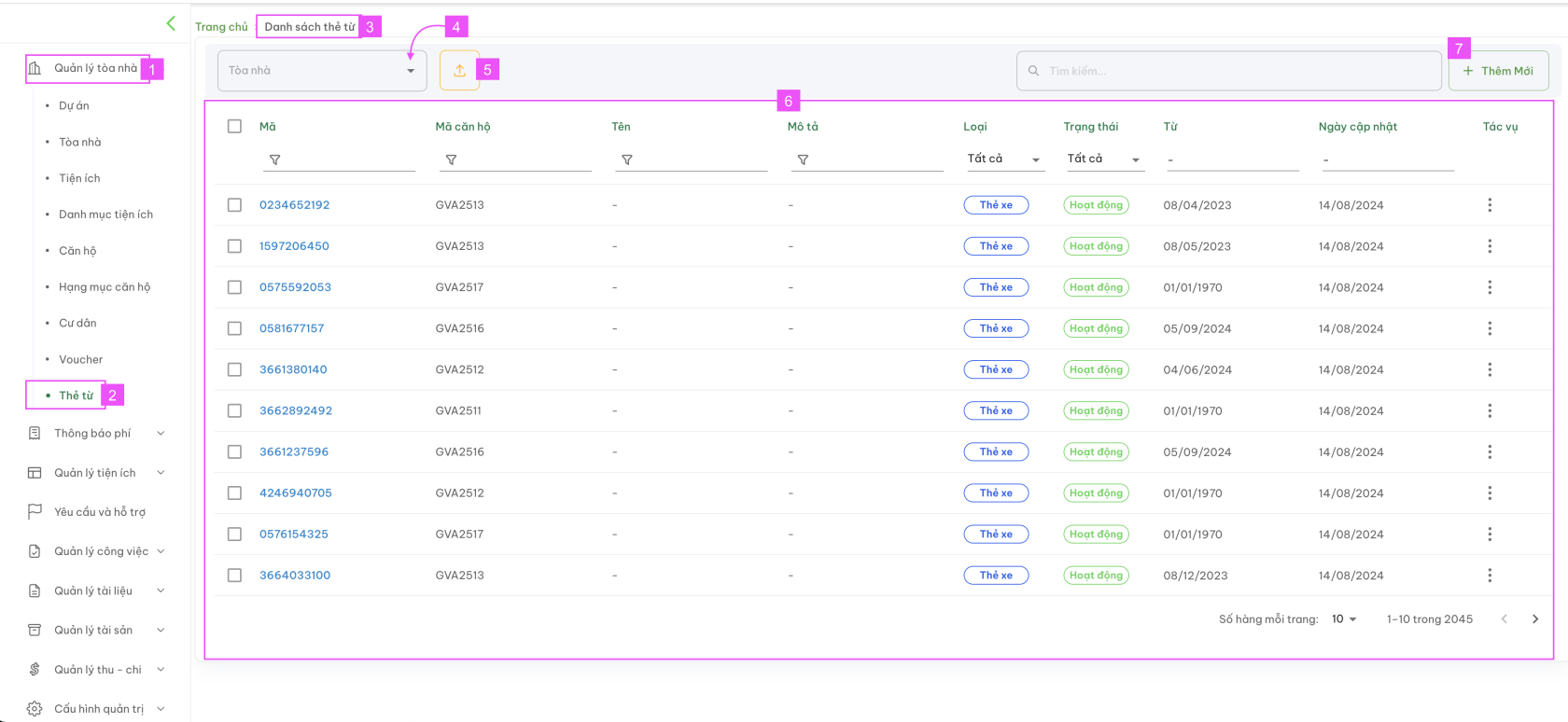
<span style="color: rgb(0, 0, 0);"><span style="color: rgb(224, 62, 45);">**[![Screenshot 2024-08-16 at 13.24.51.png](https://docs.neohome.vn/uploads/images/gallery/2024-08/scaled-1680-/screenshot-2024-08-16-at-13-24-51.png)](https://docs.neohome.vn/uploads/images/gallery/2024-08/screenshot-2024-08-16-at-13-24-51.png)**</span></span>

- <span style="color: rgb(0, 0, 0);">**(1):** Menu Quản lý thẻ từ</span>
- <span style="color: rgb(0, 0, 0);">**(2):** Menu Thẻ từ</span>
- <span style="color: rgb(0, 0, 0);">**(3):** Danh sách thẻ từ</span>
- <span style="color: rgb(0, 0, 0);">**(4):** Chọn toà nhà để xem danh sách thẻ từ của toà nhà đó. Nếu không chọn, danh sách hiển thị là danh sách tổng.</span>
- <span style="color: rgb(0, 0, 0);">**(5):** <span style="color: rgb(230, 126, 35);">Nút tải lên</span> danh sách thẻ từ</span>
- <span style="color: rgb(0, 0, 0);">**(6):** Danh sách thẻ từ đang có thuộc dự án</span>
- <span style="color: rgb(0, 0, 0);">**(7):** Nút <span style="color: rgb(45, 194, 107);">Thêm mới</span></span>

*<span style="color: rgb(4, 37, 252);">Màn hình Danh sách thẻ từ hiển thị các nội dung, gồm:</span>*

- <span style="color: rgb(0, 0, 0);">**Mã thẻ:** Mã thẻ do Ban quản lý định nghĩa</span>
- <span style="color: rgb(0, 0, 0);">**Mã căn hộ:** Mã căn hộ theo dữ liệu của dự án</span>
- <span style="color: rgb(0, 0, 0);">**Tên:** Tên người dùng thẻ</span>
- <span style="color: rgb(0, 0, 0);">**Mô tả:** Thông tin liên quan đến thẻ. Ví dụ biển số xe | màu xe | loại xe</span>
- <span style="color: rgb(0, 0, 0);">**Loại:** Thẻ xe | Thẻ thang máy</span>
- <span style="color: rgb(0, 0, 0);">**Trạng thái:** Không hoạt động | Hoạt động | Mất | Huỷ</span>
- <span style="color: rgb(0, 0, 0);">**Từ ngày:** Ngày hiệu lực thẻ</span>
- <span style="color: rgb(0, 0, 0);">**Ngày cập nhật:** Ngày cập nhật gần nhất của thẻ</span>
- <span style="color: rgb(0, 0, 0);">**Tác vụ:** Xoá</span>

<span style="color: rgb(0, 0, 0);"><span style="color: rgb(224, 62, 45);">**Màn hình Xem chi tiết và Cập nhật thẻ từ**</span></span>

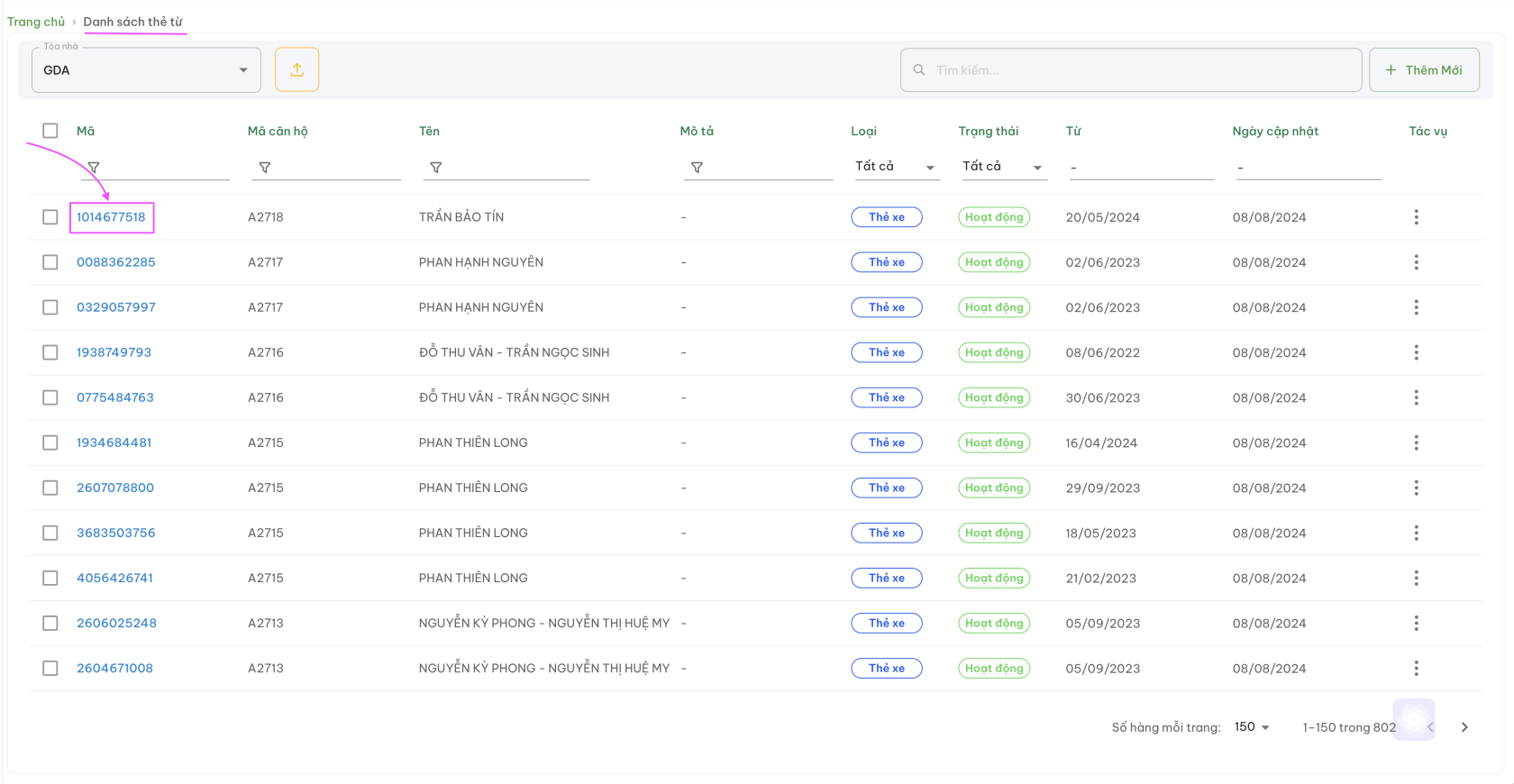
<span style="color: rgb(0, 0, 0);">Tại màn hình Danh sách thẻ từ, bấm chọn vào mã thẻ như hình bên dưới</span>

<span style="color: rgb(0, 0, 0);"><span style="color: rgb(224, 62, 45);">**[![Screenshot 2024-08-16 at 14.34.10.png](https://docs.neohome.vn/uploads/images/gallery/2024-08/scaled-1680-/screenshot-2024-08-16-at-14-34-10.png)](https://docs.neohome.vn/uploads/images/gallery/2024-08/screenshot-2024-08-16-at-14-34-10.png)**</span></span>

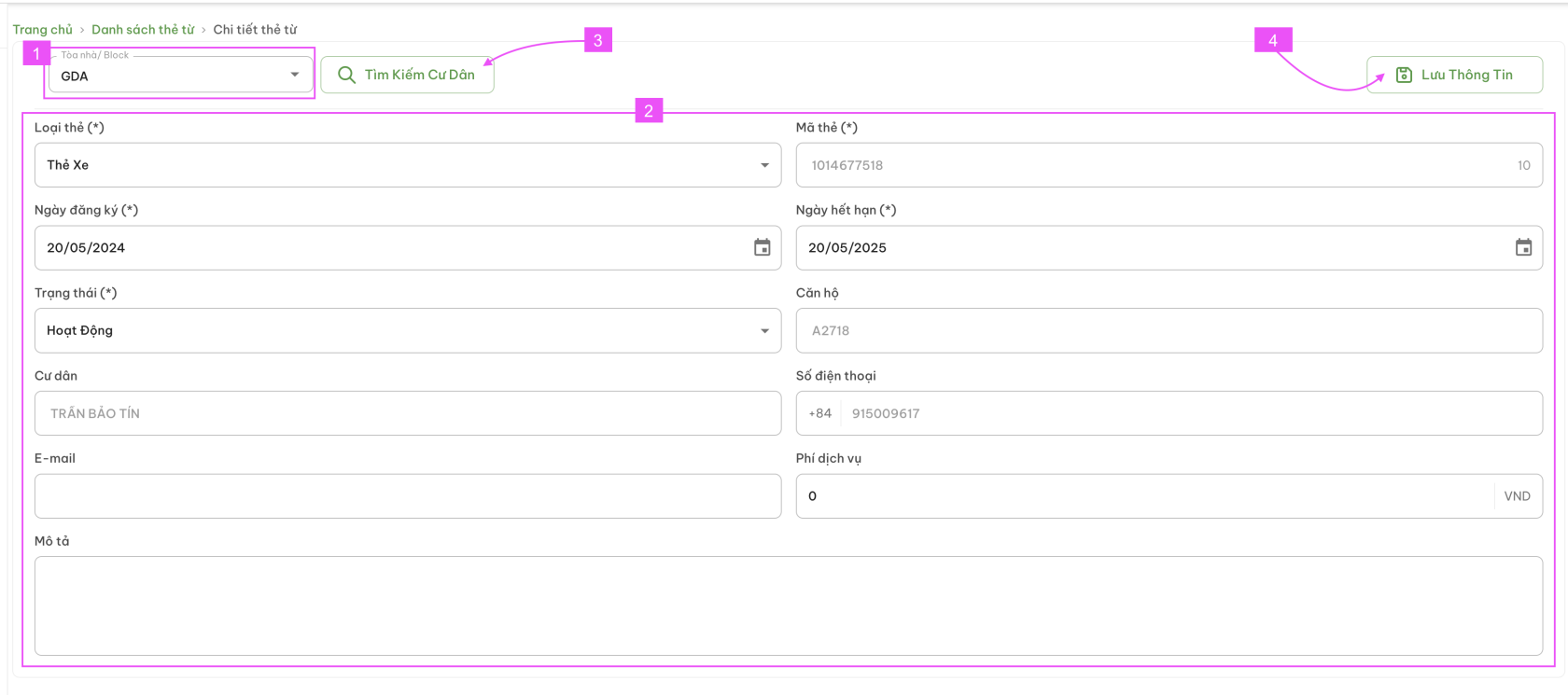
<span style="color: rgb(0, 0, 0);">Tại đây, người dùng có thể xem được thông tin:</span>

- <span style="color: rgb(0, 0, 0);">Thẻ thuộc toà nhà nào (1) </span>
- <span style="color: rgb(0, 0, 0);"><span style="color: rgb(22, 145, 121);">**Xem chi tiết thông tin thẻ (2)** </span></span>
- <span style="color: rgb(0, 0, 0);"><span style="color: rgb(22, 145, 121);"><span style="color: rgb(0, 0, 0);">Hoặc thay đổi | cập nhật thông tin vào các trường dữ liệu và bấm Lưu thông tin (4)</span></span></span>

<span style="color: rgb(0, 0, 0);"><span style="color: rgb(224, 62, 45);">**[![Screenshot 2024-08-16 at 13.51.43.png](https://docs.neohome.vn/uploads/images/gallery/2024-08/scaled-1680-/screenshot-2024-08-16-at-13-51-43.png)](https://docs.neohome.vn/uploads/images/gallery/2024-08/screenshot-2024-08-16-at-13-51-43.png)**</span></span>

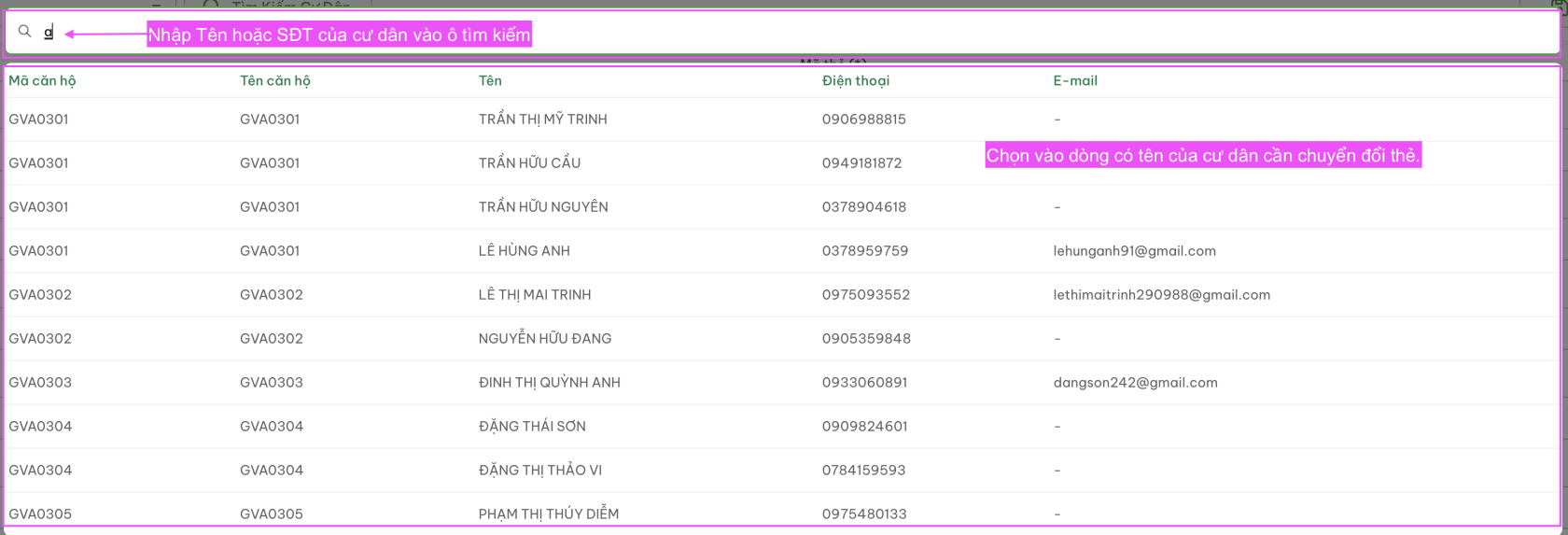
- <span style="color: rgb(0, 0, 0);"><span style="color: rgb(22, 145, 121);"><span style="color: rgb(0, 0, 0);">Ngoài ra, người dùng có thể bấm vào **<span style="background-color: rgb(194, 224, 244); color: rgb(45, 194, 107);">Tìm Kiếm Cư Dân tại (3)</span><span style="color: rgb(45, 194, 107);"> </span>**để chuyển mã thẻ này đến cư dân khác thuộc dự án. Sau khi chọn cư dân, thẻ sẽ được chuyển sang chủ thẻ là cư dân mới.</span></span></span>

<span style="color: rgb(0, 0, 0);"><span style="color: rgb(22, 145, 121);"><span style="color: rgb(0, 0, 0);">[![Screenshot 2024-08-16 at 14.44.34.png](https://docs.neohome.vn/uploads/images/gallery/2024-08/scaled-1680-/screenshot-2024-08-16-at-14-44-34.png)](https://docs.neohome.vn/uploads/images/gallery/2024-08/screenshot-2024-08-16-at-14-44-34.png)</span></span></span>

- <span style="color: rgb(0, 0, 0);"><span style="color: rgb(22, 145, 121);"><span style="color: rgb(0, 0, 0);">Có thể chỉnh sửa các trường thông tin (nếu cần) và bấm Lưu thông tin.</span></span></span>

<span style="color: rgb(224, 62, 45);">**<span style="color: rgb(0, 0, 0);"><span style="color: rgb(224, 62, 45);">Thêm mới thẻ từ</span></span>**</span>

<span style="color: rgb(0, 0, 0);">Có 2 cách thêm mới thẻ từ</span>

<span style="color: rgb(4, 37, 252);">**Cách 1: Dùng cho trường hợp THÊM 1 THẺ TỪ**</span>

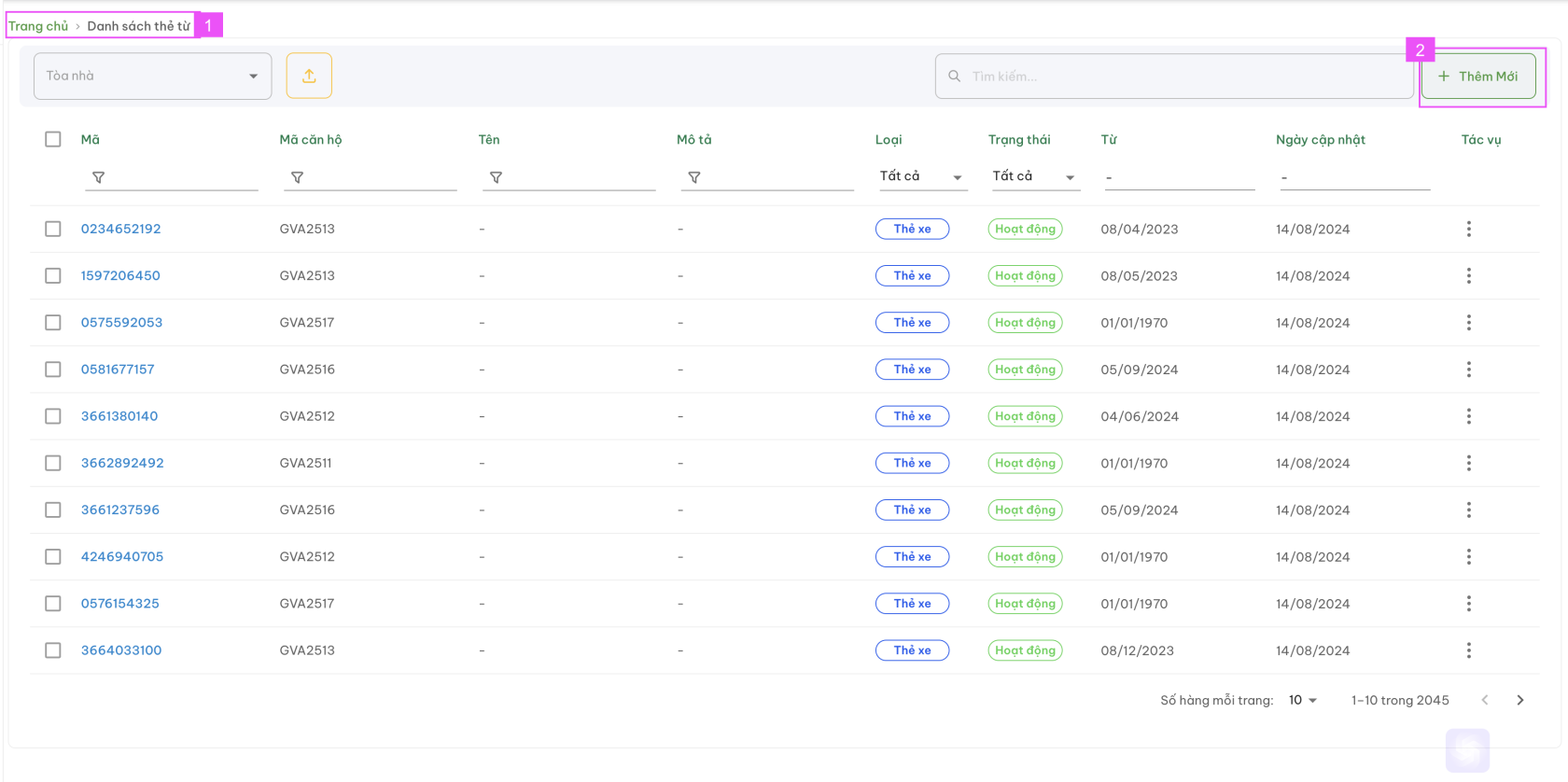
<span style="color: rgb(0, 0, 0);"><span style="color: rgb(4, 37, 252);">**<span style="color: rgb(0, 0, 0);"><span style="color: rgb(4, 37, 252);">Bước 1: </span></span>**<span style="color: rgb(0, 0, 0);">Tại màn hình Trang chủ &gt; Danh sách thẻ từ (1) &gt; Chọn vào Nút <span style="color: rgb(45, 194, 107);">+ Thêm mới </span>(2)</span></span></span>

<span style="color: rgb(0, 0, 0);"><span style="color: rgb(4, 37, 252);"><span style="color: rgb(0, 0, 0);"><span style="color: rgb(4, 37, 252);">[![Screenshot 2024-08-16 at 14.50.34.png](https://docs.neohome.vn/uploads/images/gallery/2024-08/scaled-1680-/screenshot-2024-08-16-at-14-50-34.png)](https://docs.neohome.vn/uploads/images/gallery/2024-08/screenshot-2024-08-16-at-14-50-34.png)</span></span></span></span>

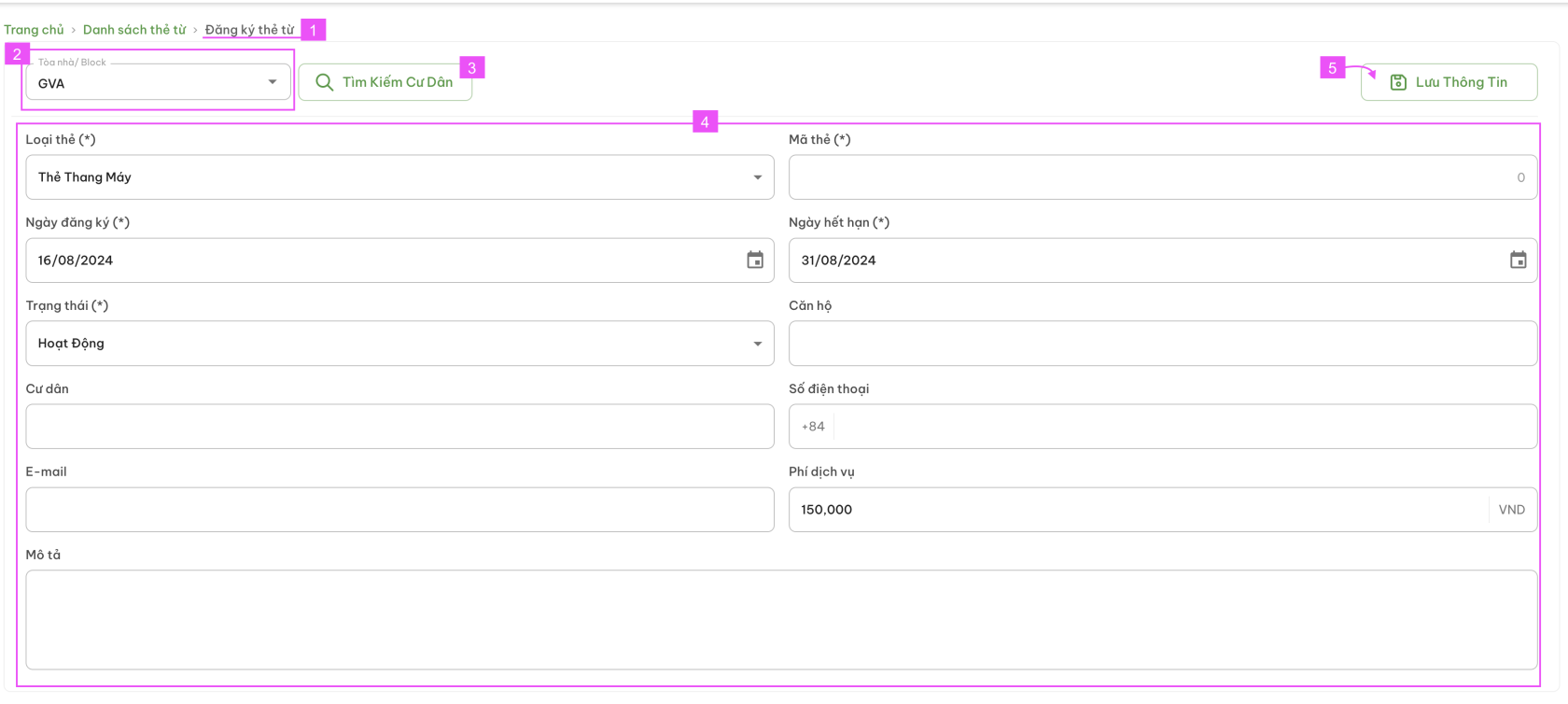
<span style="color: rgb(0, 0, 0);"><span style="color: rgb(4, 37, 252);">**Bước 2:** </span>Tại màn hình Thêm mới | Đăng ký thẻ từ (1) &gt; Chọn toà nhà (2)</span>

- - - - - <span style="color: rgb(0, 0, 0);">Nhập thông tin vào các trường tại mục 4 --&gt; Bấm Lưu thông tin (5) để hoàn tất</span><span style="color: rgb(0, 0, 0);"><span style="color: rgb(4, 37, 252);">**[![Screenshot 2024-08-16 at 14.52.51.png](https://docs.neohome.vn/uploads/images/gallery/2024-08/scaled-1680-/screenshot-2024-08-16-at-14-52-51.png)](https://docs.neohome.vn/uploads/images/gallery/2024-08/screenshot-2024-08-16-at-14-52-51.png)**</span></span>
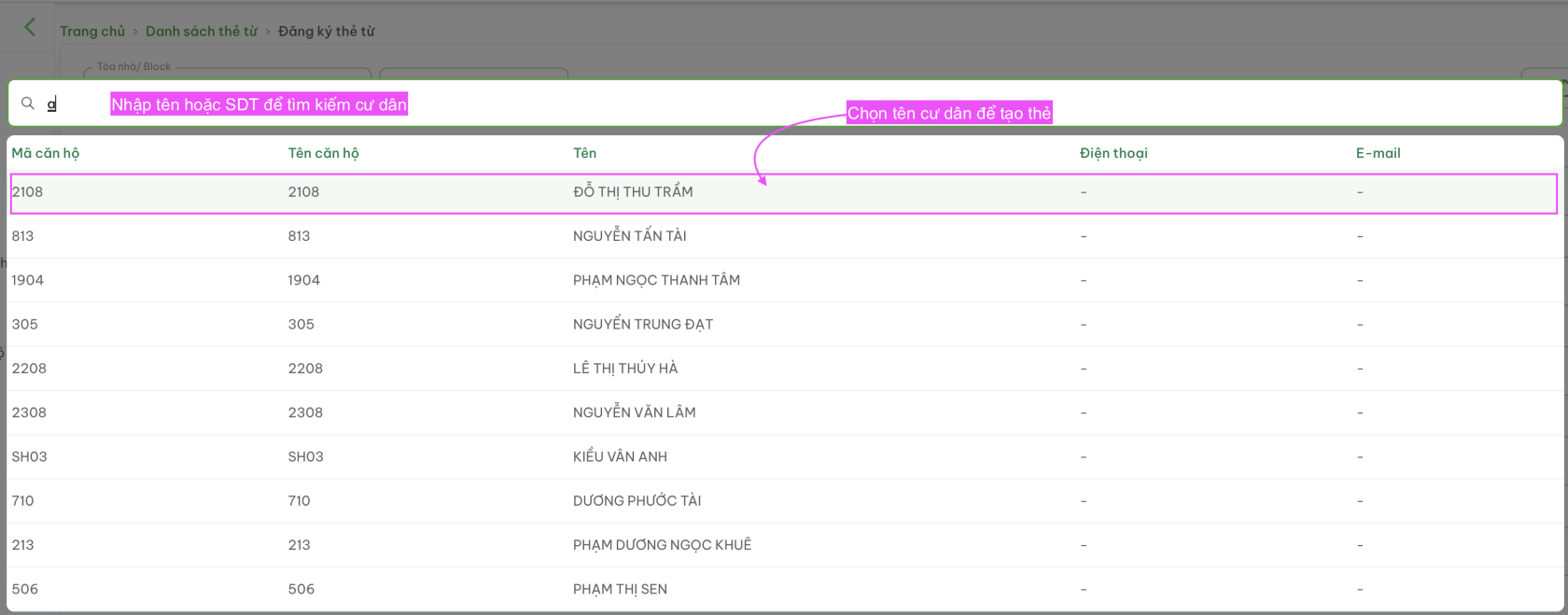
            - <span style="color: rgb(0, 0, 0);">Hoặc bấm vào ô **<span style="color: rgb(45, 194, 107);">Tìm Kiếm Cư Dân (3) </span>**để tìm tên cư dân cần tạo thẻ --&gt; Chọn tên cư dân trong danh sách hiển thị tại màn hình tìm kiếm </span>
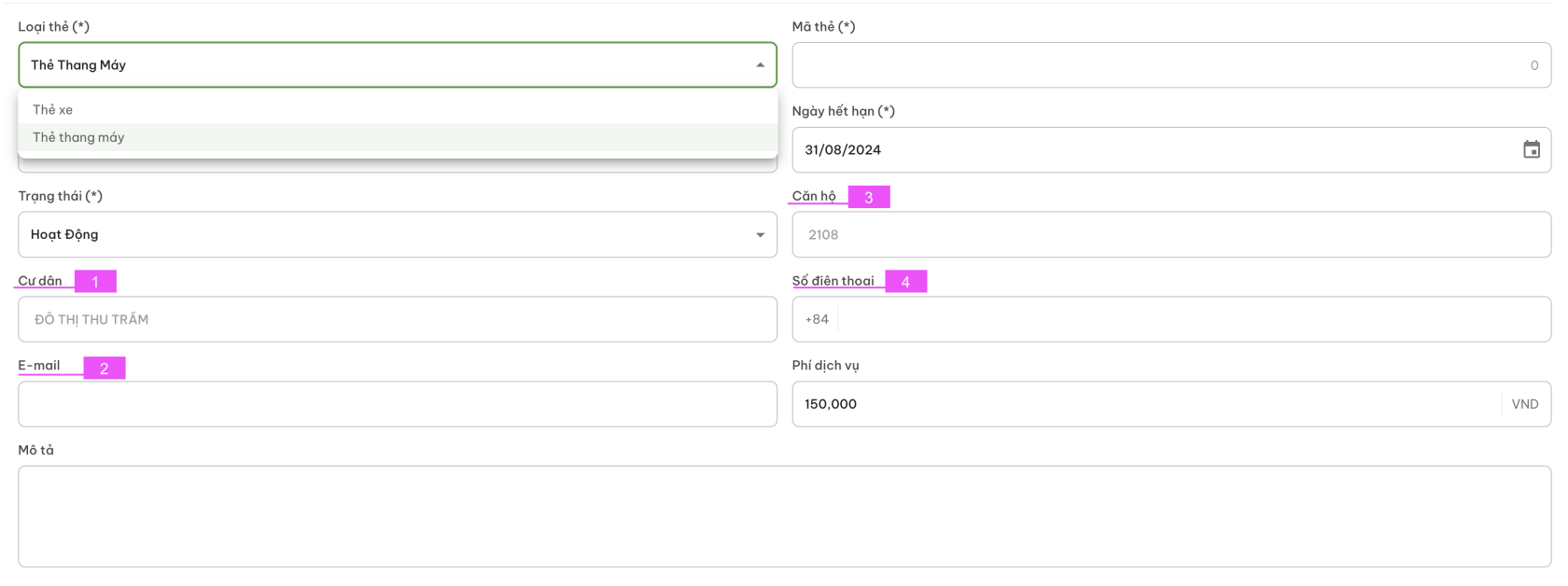
        - <span style="color: rgb(0, 0, 0);">[![Screenshot 2024-08-16 at 15.12.20.png](https://docs.neohome.vn/uploads/images/gallery/2024-08/scaled-1680-/screenshot-2024-08-16-at-15-12-20.png)](https://docs.neohome.vn/uploads/images/gallery/2024-08/screenshot-2024-08-16-at-15-12-20.png)</span><span style="color: rgb(0, 0, 0);">--&gt; Các trường thông tin : Cư dân | Căn hộ | Email (nếu có) | Số điện thoại (nếu có) của cư dân sẽ tự động được điền vào</span>
        - <span style="color: rgb(0, 0, 0);">[![Screenshot 2024-08-16 at 15.13.51.png](https://docs.neohome.vn/uploads/images/gallery/2024-08/scaled-1680-/screenshot-2024-08-16-at-15-13-51.png)](https://docs.neohome.vn/uploads/images/gallery/2024-08/screenshot-2024-08-16-at-15-13-51.png)</span><span style="color: rgb(0, 0, 0);">--&gt; Nhập và chọn đầy đủ các trường thông tin còn lại và bấm **<span style="color: rgb(45, 194, 107);">Lưu thông tin (5)</span>** để hoàn tất.</span>

<span style="color: rgb(0, 0, 0);"><span style="color: rgb(4, 37, 252);">**Cách 2: Dùng cho trường hợp THÊM HÀNG LOẠT THẺ TỪ (FILE UPLOAD)**</span></span>

<p class="callout warning"><span style="color: rgb(224, 62, 45);">*Lưu ý: Tách riêng danh sách thẻ của từng toà nhà. Hệ thống chưa hỗ trợ tải lên hàng loạt cho tất cả.* </span></p>

<span style="color: rgb(0, 0, 0);"><span style="color: rgb(4, 37, 252);">[![Screenshot 2024-08-16 at 15.19.41.png](https://docs.neohome.vn/uploads/images/gallery/2024-08/scaled-1680-/qQPscreenshot-2024-08-16-at-15-19-41.png)](https://docs.neohome.vn/uploads/images/gallery/2024-08/qQPscreenshot-2024-08-16-at-15-19-41.png)</span></span>

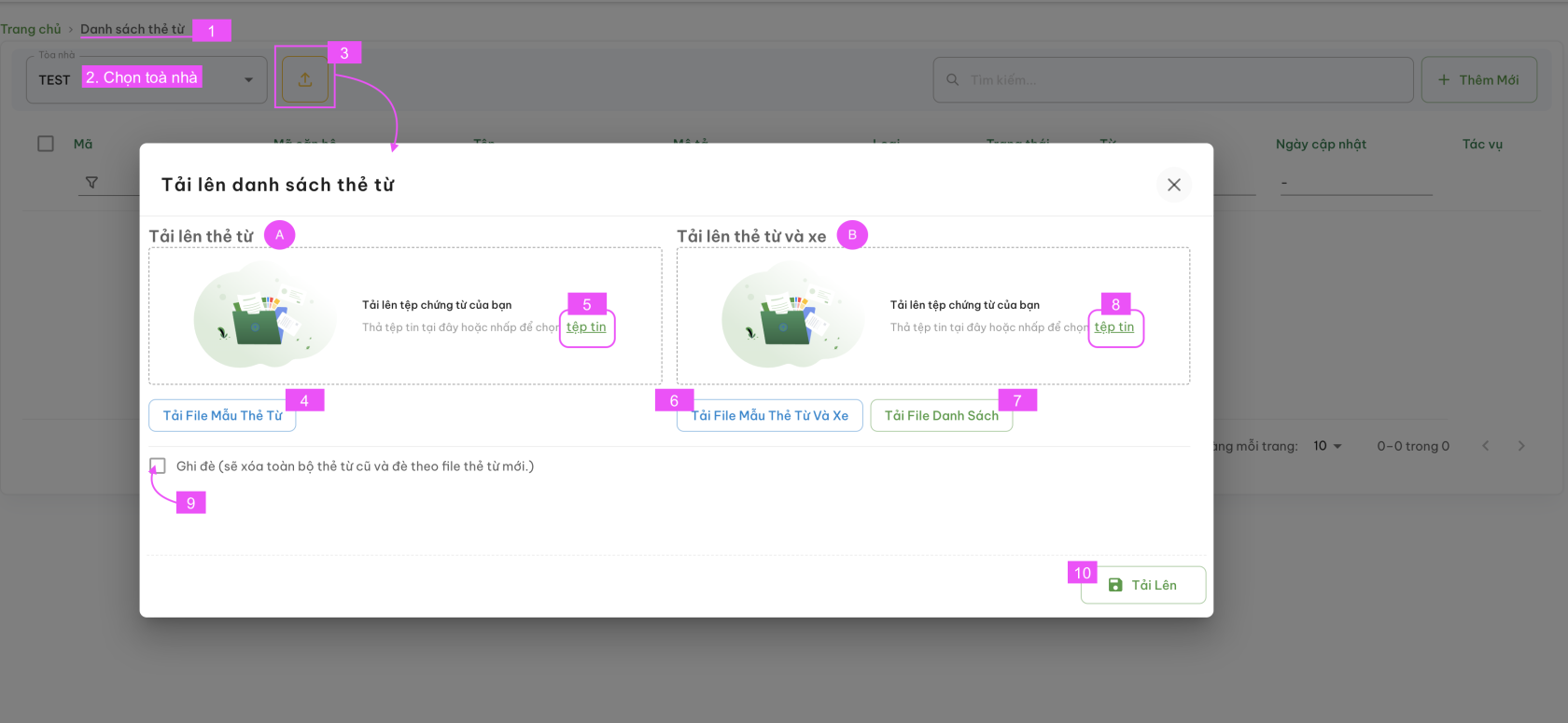
<span style="color: rgb(0, 0, 0);"><span style="color: rgb(4, 37, 252);">**Bước 1:** <span style="color: rgb(0, 0, 0);">Tại Màn hình Danh sách thẻ từ (1) &gt; Chọn toà nhà (2) &gt; Chọn nút Tải lên (3) để vào Màn hình **Tải lên danh sách thẻ từ**</span></span></span>

<span style="color: rgb(4, 37, 252);">**Bước 2:** </span><span style="color: rgb(0, 0, 0);">Có 2 lựa chọn</span>

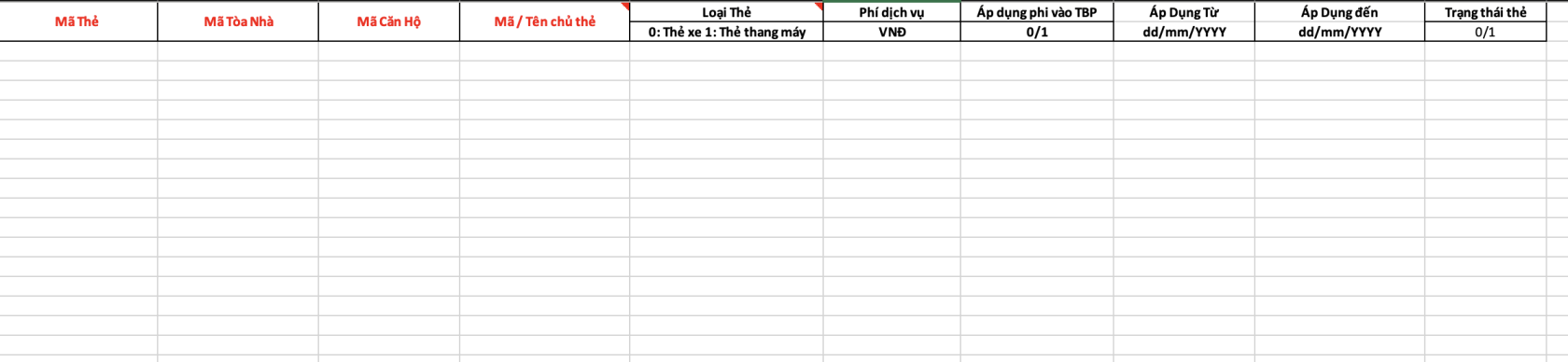
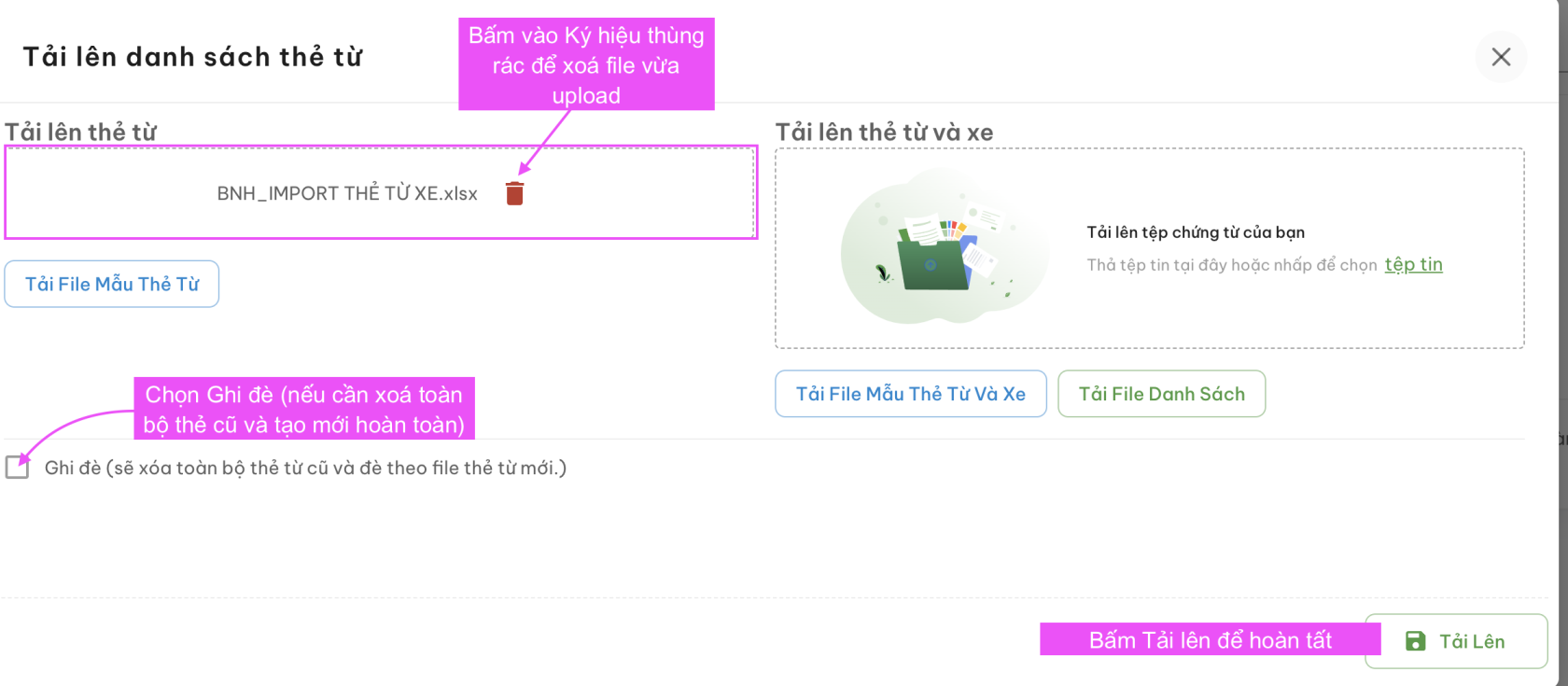
- - - - - <span style="color: rgb(0, 0, 0);"><span style="text-decoration: underline;">**Chỉ tải lên Danh sách thẻ từ <span style="color: rgb(250, 11, 234); text-decoration: underline;">(A)</span>**</span></span><span style="color: rgb(0, 0, 0);">- Bấm (4) Tải file mẫu về máy và điền đầy đủ thông tin như file mẫu yêu cầu</span><span style="color: rgb(0, 0, 0);">[![Screenshot 2024-08-16 at 15.32.10.png](https://docs.neohome.vn/uploads/images/gallery/2024-08/scaled-1680-/screenshot-2024-08-16-at-15-32-10.png)](https://docs.neohome.vn/uploads/images/gallery/2024-08/screenshot-2024-08-16-at-15-32-10.png)</span><span style="color: rgb(0, 0, 0);">- Bấm (5) để tải lên (upload) file đã điền đủ thông tin thẻ lên hệ thống</span>[![Screenshot 2024-08-16 at 15.36.29.png](https://docs.neohome.vn/uploads/images/gallery/2024-08/scaled-1680-/screenshot-2024-08-16-at-15-36-29.png)](https://docs.neohome.vn/uploads/images/gallery/2024-08/screenshot-2024-08-16-at-15-36-29.png)
                    - <span style="color: rgb(0, 0, 0);">**Tải lên Danh sách thẻ từ + Xe <span style="color: rgb(250, 11, 234);">(B)</span>**</span>

<span style="color: rgb(0, 0, 0);"><span style="color: rgb(4, 37, 252);"><span style="color: rgb(0, 0, 0);">- Bấm (6) Tải file mẫu về máy và điền đầy đủ thông tin như file mẫu yêu cầu</span></span></span>

<span style="color: rgb(0, 0, 0);"><span style="color: rgb(4, 37, 252);"><span style="color: rgb(0, 0, 0);">[![Screenshot 2024-08-16 at 15.46.54.png](https://docs.neohome.vn/uploads/images/gallery/2024-08/scaled-1680-/screenshot-2024-08-16-at-15-46-54.png)](https://docs.neohome.vn/uploads/images/gallery/2024-08/screenshot-2024-08-16-at-15-46-54.png)</span></span></span>

<span style="color: rgb(0, 0, 0);"><span style="color: rgb(4, 37, 252);"><span style="color: rgb(0, 0, 0);">- Bấm (7) để tải về file excel danh sách thẻ đang có.</span></span></span>

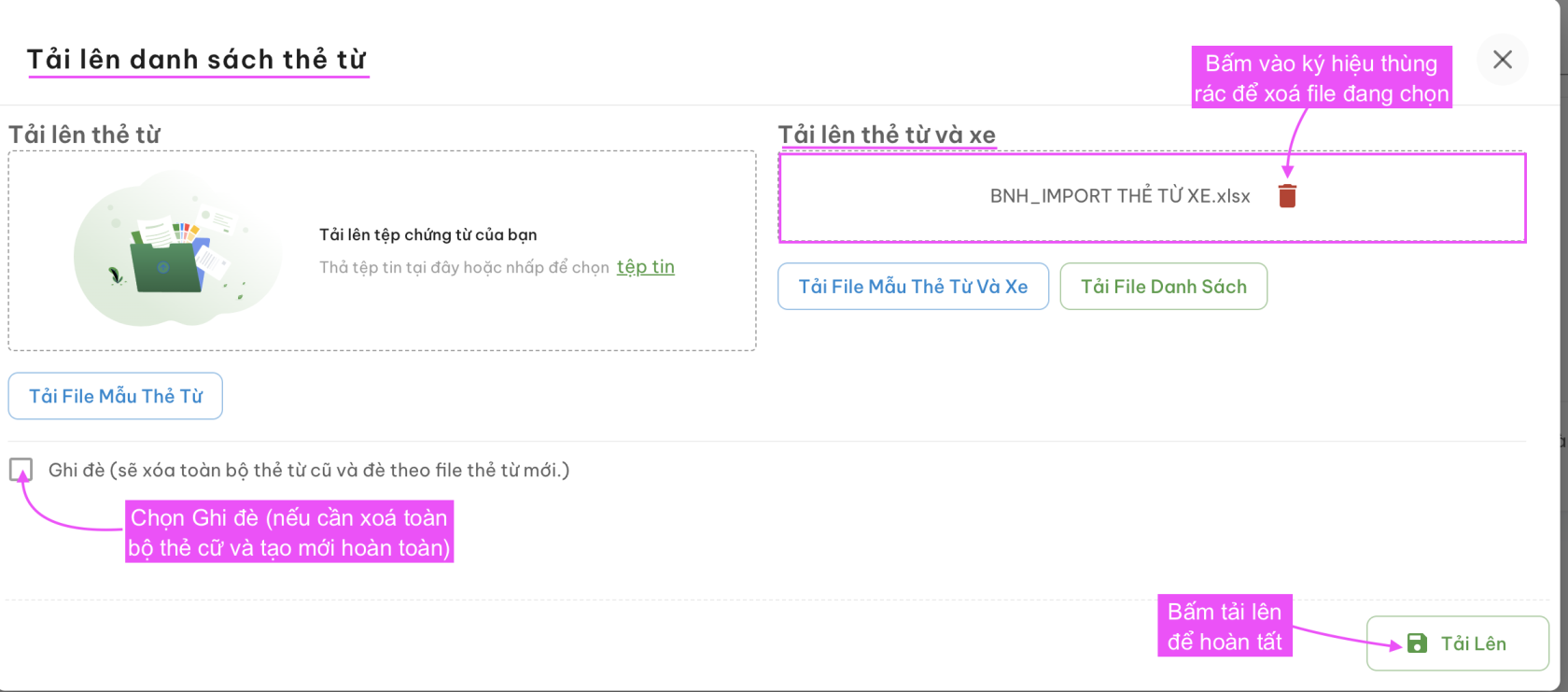
<span style="color: rgb(0, 0, 0);"><span style="color: rgb(4, 37, 252);"><span style="color: rgb(0, 0, 0);">- Bấm (8) để tải lên (upload file) đã điền đủ thông tin thẻ lên hệ thống</span></span></span>

<span style="color: rgb(0, 0, 0);"><span style="color: rgb(4, 37, 252);"><span style="color: rgb(0, 0, 0);">[![Screenshot 2024-08-16 at 15.50.03.png](https://docs.neohome.vn/uploads/images/gallery/2024-08/scaled-1680-/screenshot-2024-08-16-at-15-50-03.png)](https://docs.neohome.vn/uploads/images/gallery/2024-08/screenshot-2024-08-16-at-15-50-03.png)</span></span></span>

<span style="color: rgb(0, 0, 0);"><span style="color: rgb(4, 37, 252);"><span style="color: rgb(0, 0, 0);"><span style="color: rgb(4, 37, 252);">**Bước 2:** <span style="color: rgb(0, 0, 0);">Tạo mới thành công, hệ thống sẽ hiển thị màn hình Danh sách thẻ từ.</span></span></span></span></span>

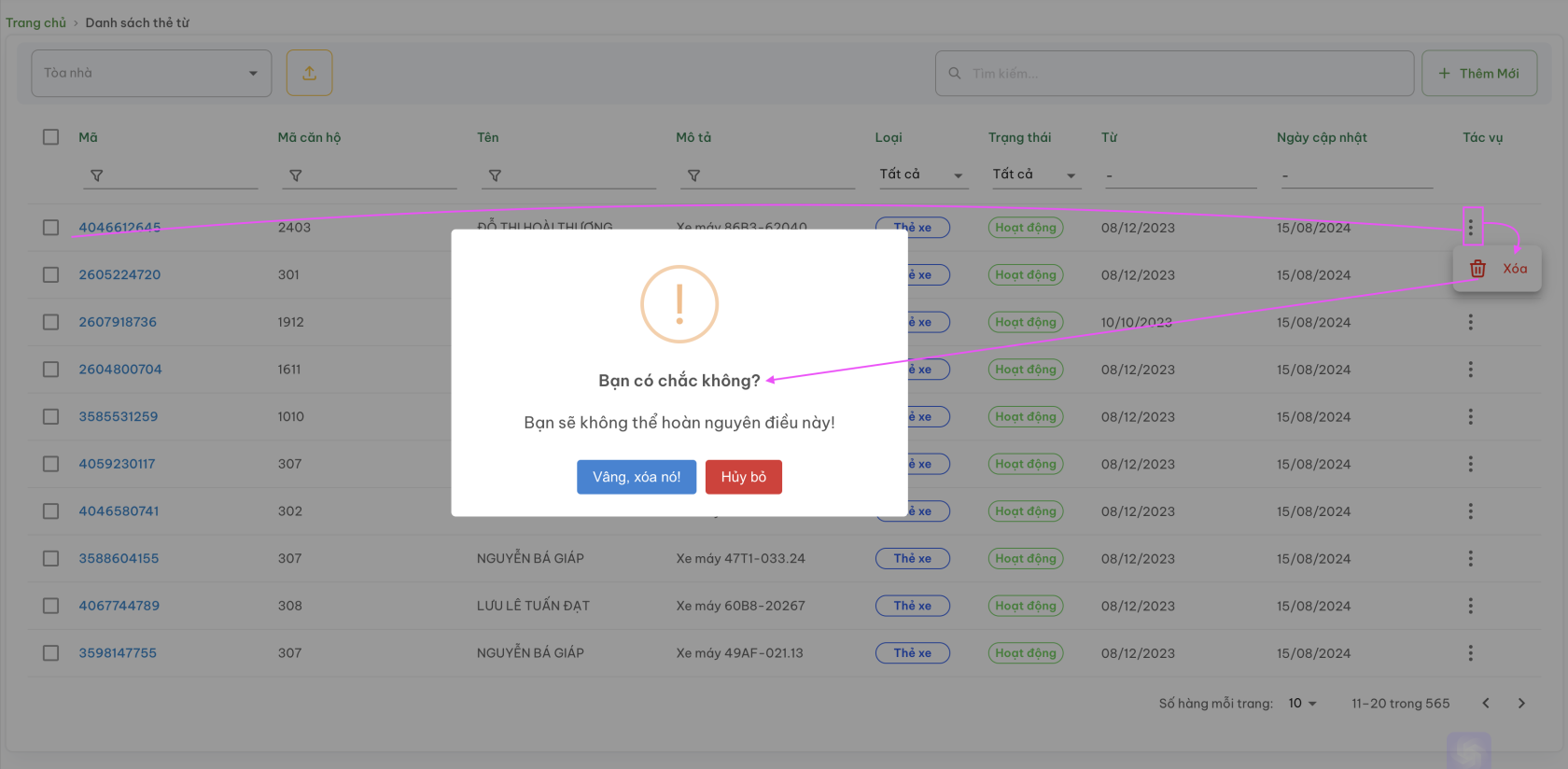
<span style="color: rgb(0, 0, 0);"><span style="color: rgb(4, 37, 252);">**<span style="color: rgb(0, 0, 0);"><span style="color: rgb(224, 62, 45);">Xoá thẻ từ</span></span>**</span></span>

<span style="color: rgb(0, 0, 0);"><span style="color: rgb(4, 37, 252);"><span style="color: rgb(0, 0, 0);"><span style="color: rgb(224, 62, 45);"><span style="color: rgb(0, 0, 0);">Thẻ từ sau khi xoá sẽ không khôi phục được thông tin và những dữ liệu liên quan đến thẻ sẽ không còn tồn tại trên hệ thống</span></span></span></span></span>

<span style="color: rgb(0, 0, 0);"><span style="color: rgb(4, 37, 252);">**<span style="color: rgb(0, 0, 0);"><span style="color: rgb(224, 62, 45);">[![Screenshot 2024-08-16 at 15.56.21.png](https://docs.neohome.vn/uploads/images/gallery/2024-08/scaled-1680-/screenshot-2024-08-16-at-15-56-21.png)](https://docs.neohome.vn/uploads/images/gallery/2024-08/screenshot-2024-08-16-at-15-56-21.png)</span></span>**</span></span>

<span style="color: rgb(4, 37, 252);">**Bước 1:** </span>Chọn dòng có chứa Mã thẻ muốn xoá

**<span style="color: rgb(4, 37, 252);">Bước 2:</span>** Tại nút tác vụ - 3 chấm - Chọn xoá

**<span style="color: rgb(4, 37, 252);">Bước 3: </span>**Xác nhận: "Vâng, xoá nó!" --&gt; Thẻ sẽ được xoá khỏi hệ thống hoặc "Huỷ bỏ" để huỷ lệnh xoá đã chọn.